Almost every Nigerian business owner evaluating web proposals hits the same fork in the road: Agency A proposes a WordPress website, while Agency B proposes a custom-engineered web platform. Both promise a sleek visual result and an easy way to edit text. How do you know which stack actually protects your margins, Google rankings, and brand reputation over the next three years?
As an engineering studio that builds greenfield React/TypeScript platforms and routinely rescues slow legacy sites, here is an objective, no-hype comparison of custom website vs WordPress in 2026.
Where WordPress Still Works—and Where It Breaks
WordPress powers a massive share of the web and is not inherently bad software. For an online magazine, a high-volume editorial blog, or a simple company brochure managed by non-technical staff—when built cleanly with minimal plugins and hosted on strong servers—WordPress does its job well.
Trouble starts when businesses force WordPress to act like bespoke software using heavy drag-and-drop page builders (Elementor, Divi, WPBakery) stacked with 20 to 35 third-party plugins for popups, forms, WhatsApp widgets, booking calendars, sliders, caching, security, and ecommerce. Every additional plugin introduces extra database queries, uncoordinated JavaScript files, and an external vendor whose update might break your layout overnight.
Head-to-Head: Speed, Security, SEO & Ownership
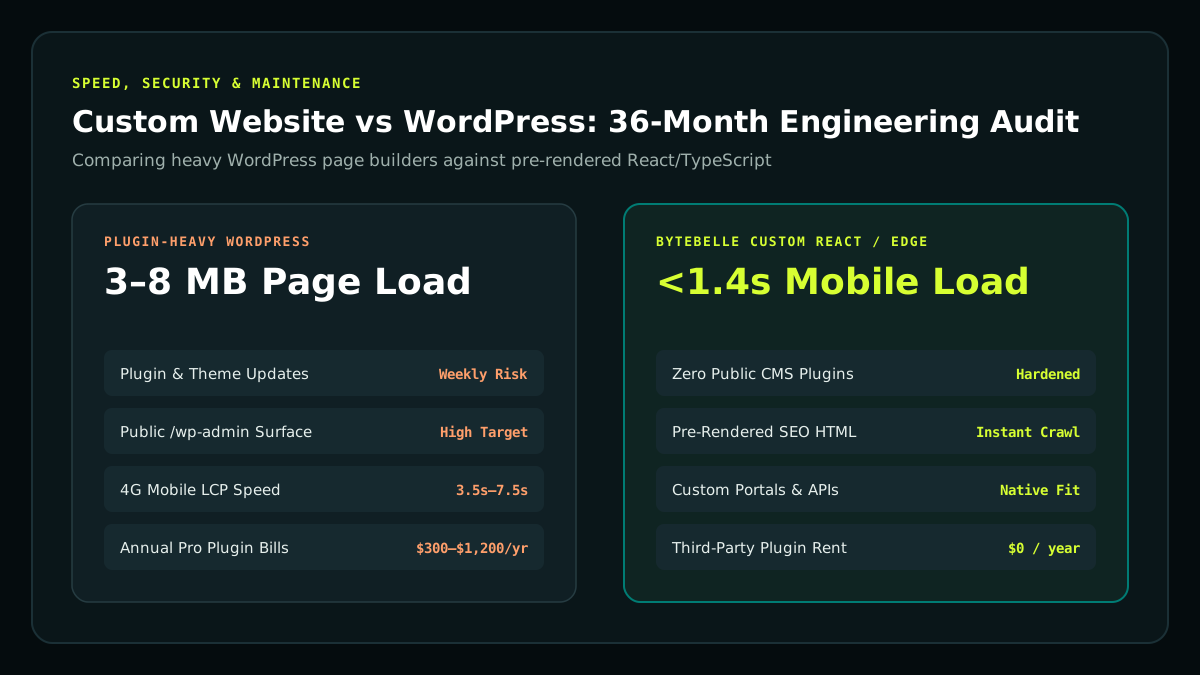
| Dimension | Heavy Plugin WordPress Site | ByteBelle Custom Web Platform (React / TS / Edge) |
|---|---|---|
| Mobile Page Weight & Speed | Often 3–8 MB from theme & plugin JS/CSS bloat | Sub-second pre-rendered/edge HTML with lean WebP assets |
| Security Attack Surface | Public /wp-admin, PHP execution & third-party plugin CVEs | Static/edge front end with zero public plugin endpoints to exploit |
| SEO & AI Search Structure | Dependent on plugin settings & manual archive cleanup | Native semantic HTML5, clean canonicals, baked-in JSON-LD schema |
| Custom Workflows & Portals | Fragile workarounds stitched across incompatible plugins | Engineered cleanly around your exact business rules & APIs |
| Ongoing Software Overhead | Weekly plugin patches, PHP upgrades & annual pro licences | Predictable care with zero third-party plugin licence rent |
Want to measure how your current site performs right now? Run your URL through ByteBelle's free AI Search & SEO Checker or review Google's Core Web Vitals thresholds.
Why Heavy Page Builders Hurt Nigerian Mobile Conversion
Over three-quarters of commercial web traffic in Nigeria arrives on mobile phones over variable 3G and 4G data networks. When a WordPress page builder ships 3.5 MB of unused CSS and 18 render-blocking scripts on shared hosting, a customer tapping your Instagram or Google link waits 5 to 9 seconds staring at a half-loaded screen.
Half of mobile visitors abandon pages that stall past three seconds—meaning heavy template bloat quietly cuts the return on every Naira you spend on Meta or Google Ads. Clean static/SSR React architectures pre-render exact HTML at build time, serve compressed WebP images sized per screen width, and load only the code required for the current route.
The Hidden Cost of 'Free' Plugins Over 36 Months
Because WordPress core is free, business owners assume software overhead is zero. Over 36 months on a typical commercial build, hidden costs compound steadily:
- Annual Pro Plugin Licences: Page builder pro plans, premium form builders, security firewalls, backup add-ons, and WooCommerce shipping or subscription extensions easily total $300–$1,200/year in USD card billing.
- Pirated / Nulled Theme Malware Risk: Too many cut-price freelancers install pirated premium themes to lower upfront quotes—leaving backdoors that inject spam links and get domains blacklisted by Google Safe Browsing.
- Update Breakage & Developer Rescue Bills: One incompatible PHP or plugin update can crash checkout or contact forms until a developer restores backups and patches conflicts.
Compare that ongoing friction with commissioning a clean custom build once under our Growth Package or Byte Launchpad.
Decision Checklist: Which Stack Fits Your Business?
- Choose a lean, well-maintained WordPress setup if you run a pure editorial publication publishing daily news articles on a tight budget and already have reliable technical maintenance covering weekly backups and updates.
- Choose a Custom ByteBelle Web Platform if mobile conversion speed, corporate credibility, zero plugin security headaches, bespoke quoting/booking flows, ecommerce ownership, or strong Google & AI search structure matter to your growth.
Need to upgrade an existing slow website without losing your search authority? Explore Web Design & Development, inspect our Website Cost Guide in Nigeria, or request a Cloud & Performance Engineering audit.
Migrating Off WordPress Without Losing SEO Traffic
Many Nigerian founders hesitate to leave a slow WordPress site because they already rank for valuable keywords or have 50+ published blog posts. Moving to a custom-engineered React or TypeScript platform does not reset your SEO—provided your engineering team executes a disciplined migration:
- Full URL Inventory & 301 Redirect Mapping: Export every indexed page, blog post, and portfolio URL from your existing sitemap before touching DNS. Map every legacy path to its new canonical URL with permanent 301 redirects so link equity transfers cleanly.
- Preserving & Upgrading Structured Data: Carry over existing titles and meta descriptions—or improve them—while replacing bloated plugin-generated HTML with clean JSON-LD graphs (
Organization,Service,BlogPosting,FAQPage).
- Media & Content Cleanup: Convert oversized
.jpgand.pnguploads into responsive.webpassets and eliminate thin tag/author archive pages that waste crawl budget.
Real-World Scenarios: When Each Platform Wins
| Business Scenario | Recommended Architecture | Why It Wins Over 3 Years |
| :--- | :--- | :--- |
| Solo News Blogger / Weekly Magazine | Lean WordPress (Minimal Plugins + CDN) | Built-in editorial workflow for non-technical writers on a tight initial budget |
| B2B Law Firm, Consultancy or Real Estate Brand | Custom React / Pre-Rendered Web Platform | Sub-second mobile load, zero plugin vulnerabilities, crisp bespoke brand trust |
| High-Growth Retail / Fashion Brand | Byte Launchpad Custom Storefront | Zero Shopify/WooCommerce plugin conflicts, direct Paystack checkout, 100% ownership |
| Booking Platform, Marketplace or SaaS Portal | Custom Full-Stack App (React + PostgreSQL/Supabase) | Clean role permissions, live dashboards, API integrations impossible to hack reliably in WP |
Summary: Build for Where Your Business Will Be in 24 Months
If your website is simply a temporary placeholder while testing an idea, a minimal template gets you online quickly. Once your website drives meaningful revenue, corporate trust, or paid ad traffic, plugin bloat and sluggish mobile performance become an invisible tax on every campaign.
Compare our transparent Website Packages, inspect ByteBelle's Case Studies to see custom platforms in production, or run your current WordPress URL through our free AI Search & SEO Checker to see exact speed and structural gaps.
Performance & Security Engineering Checklist for Any Web Stack
Whether you stay on a tuned WordPress installation or commission a custom React/TypeScript build, hold your engineering partner accountable to six measurable production benchmarks:
- Pre-Rendered HTML Delivery: Search engines and AI assistants should receive complete, readable headings, paragraphs, and JSON-LD structured data in the initial HTTP document without waiting on slow client-side spinners.
- Responsive WebP Media Pipeline: Every hero banner and portfolio screenshot should be served in properly sized WebP or AVIF formats with explicit width and height attributes to eliminate layout jump.
- Zero Exposed Admin Surfaces on Static/Edge Sites: Separating public storefront/marketing pages from authenticated backend consoles removes the brute-force login bots that constantly hammer standard
/wp-login.phpendpoints.
- Automated Daily Backups & Git Version Control: Every code change should live in version-controlled Git repositories with instant rollback capability, never edited live inside a production cPanel file manager.
- Core Web Vitals Budget: Target Largest Contentful Paint under 2.5 seconds and Interaction to Next Paint under 200ms on throttled mid-tier Android phones, following Google Search Central guidelines.
- Direct Vendor & Domain Ownership: Your business should own the domain registrar account, Cloudflare/CDN dashboard, and Git repository directly—so you are never locked into a single agency.
Editorial Workflow: How Non-Technical Teams Publish Without WordPress
A common myth is that moving off WordPress forces your marketing team to ask a software engineer every time they want to fix a typo or publish a new blog post. Modern custom platforms solve this cleanly with structured content collections, schema-validated editorial forms, or headless CMS dashboards. Your writers edit headlines, pricing tables, case studies, and SEO fields inside a clean interface—while the front-end code stays locked against accidental layout breaks or malicious third-party plugins.
Equally important, static pre-rendering turns every newly published article into fast, cacheable HTML ready for Googlebot and AI search crawlers within seconds of deployment. Instead of installing five overlapping caching, SEO, and security plugins just to keep WordPress responsive under traffic spikes, your engineering stack handles speed, canonical tags, and structured metadata natively by default.
Post-Launch Maintenance: Total Effort Comparison
Over a three-year lifecycle, operational stress is just as real a cost as Naira or Dollar invoices. WordPress administrators spend hours auditing plugin compatibility changelogs, restoring backups after failed PHP updates, and hardening login endpoints against automated brute-force scripts. With a custom pre-rendered React and TypeScript site hosted on global edge networks, your team focuses on publishing content, testing conversion offers, and closing leads rather than firefighting CMS maintenance surprises every month.
Custom website vs WordPress: acceptance checks
Compare custom website vs WordPress with the same publishing tasks and integration requirements. Ask an editor to update a service page, preview a change and restore a previous version in both demonstrations.
The custom website vs WordPress decision should include an ownership inventory: hosting accounts, content exports, theme or application source, licences and deployment access. Both approaches need a practical maintenance owner.
When evaluating custom website vs WordPress, measure the complete page visitors actually receive rather than an empty starter theme. Use equivalent images, scripts and content so the performance comparison remains fair.
Executive FAQ: Common Questions Answered
Is a custom-coded website harder for my marketing team to update?+
Not when built properly. Modern custom websites use structured headless CMS collections or tailored admin dashboards so your team edits headlines, case studies, prices, and blog posts safely without ever accidentally breaking page layouts.
Is WordPress bad for SEO?+
WordPress core is fine for SEO, but slow page builders, duplicate tag/category archives, and conflicting SEO plugins frequently drag down Core Web Vitals and crawl efficiency. Clean static/SSR custom architectures deliver fast HTML and predictable schema out of the box.
Why do WordPress sites in Nigeria get hacked so often?+
Most compromises come from outdated third-party plugins, nulled/pirated premium themes, and weak shared hosting—not WordPress core itself. Custom static and API-separated builds eliminate PHP plugin vulnerabilities entirely.